

Prerequisites
- Python 3.12+
- Docker
Step 1: Start the Agent Control Server
Startup AgentControl server manually for local development.Local development (cloning the repo)
Prerequisites:-
uv — Fast Python package manager (
curl -LsSf https://astral.sh/uv/install.sh | sh) - Node.js 18+ — For the web dashboard (optional)
-
Server runs at
http://localhost:8000✅ -
UI runs at
http://localhost:4000✅
💡 Verify the server: Open http://localhost:8000/health — you should see {"status": "healthy", "version": "..."}.
Step 2: Install the SDK
In your agent application project:Step 3: Register Your Agent
Agent must be registered with the server. You should also add@control decorator around tools and LLM call functions.
Here is a contrived example. Reference our Examples for real world examples for specific frameworks.
Step 4: Add Controls
The easiest way to add controls is through the UI — see the UI Quickstart for a step-by-step guide. Alternatively, use the SDK as shown below or call the API directly. Run following setup script to create controls to protect your agent.selector and evaluator definitions under condition, which also enables composite and, or, and not trees.
Now, run your agent code.
🎉 Done! Your agent now blocks SSN patterns automatically.
Authentication is disabled by default for local development. When you’re ready to deploy, see the Enable Authentication guide.
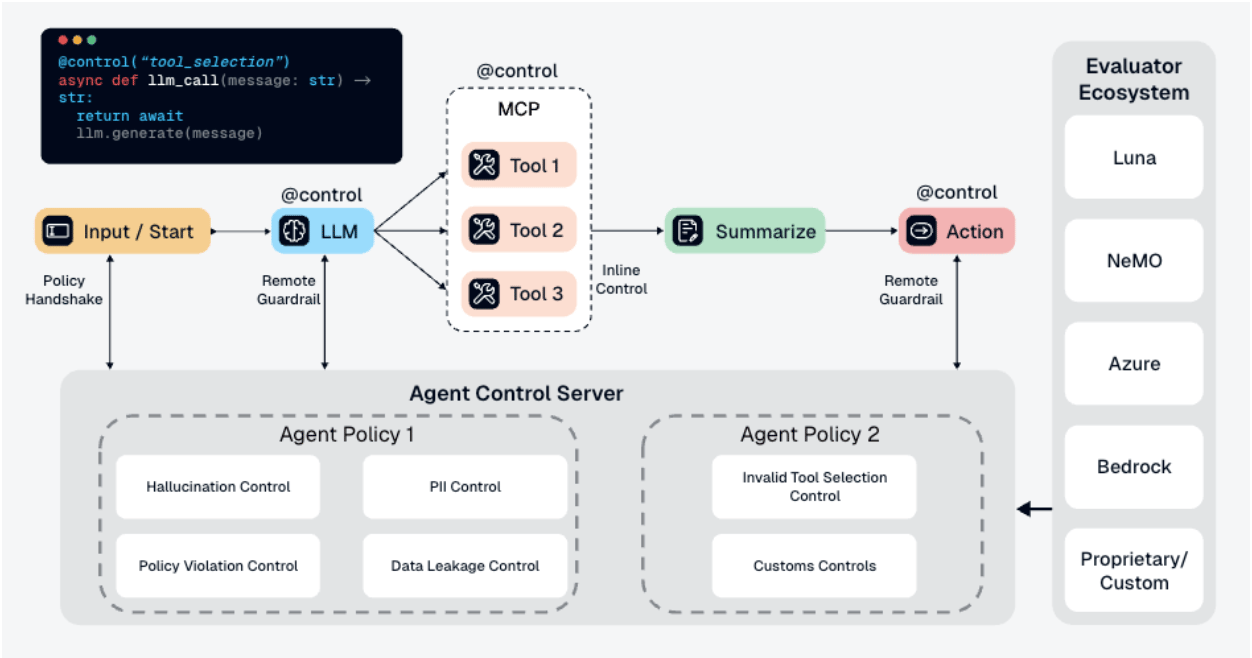
What Is Happening Under the Hood
-
Your app calls
chat("test") -
Function executes and returns
"Your SSN is 123-45-6789" -
@control()decorator sends output to Agent Control server - Server checks the output against all controls
-
block-ssncontrol finds SSN pattern → matches -
Server returns
is_safe=Falsewith the matched control -
SDK raises
ControlViolationErrorand blocks the response
- ✅ Controls are managed separately from your code
- ✅ Update controls without redeploying your agent
- ✅ Same controls can protect multiple agents
- ✅ View analytics and control execution in the dashboard
What’s Next
UI Quickstart
Manage agents and controls visually through the dashboard.
Concepts
Learn about controls, selectors, evaluators, and actions.
Examples
See working integration examples with LangChain, CrewAI, and more.
Performance
See benchmark results showing Agent Control adds negligible latency.